Thursday, 1 October 2020

HTML and CSS   UI design Product Layout 2020


PUMA FOOTBALL PRODUCT UI DESIGN

Hey friends, today we will make a product UI design with pure Html5 and Css3.

Here is the sample video of the design.


DOWNLOAD IMAGES FROM HERE:

HERE IS THE HTML CODE:

<!DOCTYPE html>
<html lang="en">
  <head>
    <meta charset="UTF-8" />
    <meta name="viewport" content="width=device-width, initial-scale=1.0" />
    <meta http-equiv="X-UA-Compatible" content="IE=edge">
    <link rel="stylesheet" href="style.css" />
    <title>PUMA</title>
  </head>
  <body>
    <div class="container">
      <div class="hero">
        <div class="logo">
          <img src="./logo.png" alt="" />
        </div>
        <div class="content">
          <div class="model">
            <h2>Puma 083285-02 TPU</h2>
            <ul>
              <li><strong>Brand</strong> Puma</li>
              <li><strong>Size</strong> 5</li>
              <li><strong>Material Type</strong> TPU</li>
              <li><strong>Manufacturer</strong> PUMA</li>
              <li><strong>Color</strong> ULTRA YELLOW-Black-Orange</li>
              <li><strong>Sport</strong> Soccer Ball, Football</li>
            </ul>
          </div>
          <div class="football">
              <img src="./fb.png" alt="">
          </div>
        </div>
        <div class="buy">
            <p>$22</p>
            <button>BUY NOW</button>
        </div>
        <div class="slogan">
            <div class="line"></div>
            <p>
                <strong>UNLEASH</strong>
                YOUR
                <strong>WILD</strong>
                SIDE
            </p>
        </div>
      </div>
    </div>
  </body>
</html>


HERE IS THE CSS CODE:

@import url('https://fonts.googleapis.com/css2?family=Carter+One&family=Julius+Sans+One&display=swap');
:root{
    --font1:'Carter One', cursive;
    --font2:'Julius Sans One', sans-serif;
}
*{
    margin0%;
    padding0%;
    box-sizing: border-box;
    overflow: hidden;
}
.container{
    height100vh;
    width: auto;
    max-width100%;
    max-height100%;
}
.hero{
    background-image: url(./bg.jpg);
    background-position: center;
    background-repeat: no-repeat;
    background-size: cover;
    height100vh;
    width: auto;
}
.hero .logo{
    position: absolute;
    left20px;
    top10px;  
}
.hero .logo img{
    height70px;
    width: auto; 
}
.content{
    display: flex;
    position: absolute;
    top180px;
    left50px;
    justify-content: center;
    align-items: center;
}
.content .model h2{
    font-size4rem;
    background: -webkit-linear-gradient(#db9621, #000000e1);
   -webkit-background-clip: text;
   -webkit-text-fill-color: transparent;
   letter-spacing.2rem;
   font-family: var(--font1);
}
.content ul{
    margin-top30px;
    margin-left20px;
}
.content ul li{
    font-size1.5rem;
    font-family: var(--font2);
    color: black;
    line-height3.5rem;
}
.content ul li strong{
    margin-right20px;
}
.football{
    position: relative;
    left60px;
    width500px;
}
.football img{
    height400px;
    transition: all ease 2s;

}
.football img:hover{
    transform: scale(1.05) rotate(360deg);
}
.buy{
    position: relative;
    top650px;
    right250px;
    float: right;
}
.buy p{
    font-size3.6rem;
    font-family: var(--font2);
    color: black;
    text-align: center;
}
.buy button{
    background: linear-gradient(#e9ad0a, #585213e1);
    padding15px 30px;
    margin-top30px;
    color: black;
    font-size1.6rem;
    cursor: pointer;
    outline: none;
    border: none;
    border-radius30px;
}
.buy button:hover{
    background: linear-gradient(#e9ad0a, #000000be);
}
.slogan{
    position: absolute;
    top680px;
    width300px;
    left40px;
    opacity.3;
    display: flex;
}
.slogan p{
    color: white;
    font-size2rem;
    font-family: var(--font2);
}
.slogan strong{
    color: #db9621;
    font-size3rem;
    font-family: var(--font1);
}
.slogan .line{
    background-color: #db9621;
    width5px;
    height110px;
    margin10px 10px;
}

Monday, 28 September 2020

How to get source code of any website

HOW TO GET SOURCE CODE OF ANY WEBSITE 


Hello friends, how are  you all. If you are learning web development or you are not understand the layouts of other website.

Today, I will tell you that how you can get the source code of any website on google. You can get the source code and take the layout as you want. So friends first of all we are going to install a software check the procedure below.


DOWNLOAD THE SOFTWARE

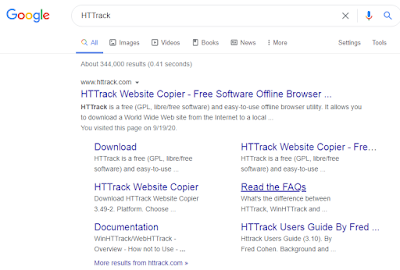
1.Go to your google home page and search the software name as HTTrack


2.Now enter in the website by clicking on www.httrack.com. After clicking you can see the interface as below image. On the above menu there is a download button, click on that and move on.


3.After clicking the download menu you can see the versions of this software, now choose the version according to your PC's requirement. And download it.


INSTALLING THE SOFTWARE

After downloading, now we are going to install the software.

1.After clicking on the software's .exe file, this type of window will popup, don't do anything, just click on the next button.


2.Now accept the agreement by clicking on the radio button and click next.


3.Choose the location, where you want to save the file/source code by using browse button and click next 


4.Check the all options and click on the next button


5.You can see the install button click on it to install the software


6.Now check the Launch WinHTTrack website copier's option and click on finish


GET THE SOURCE CODE

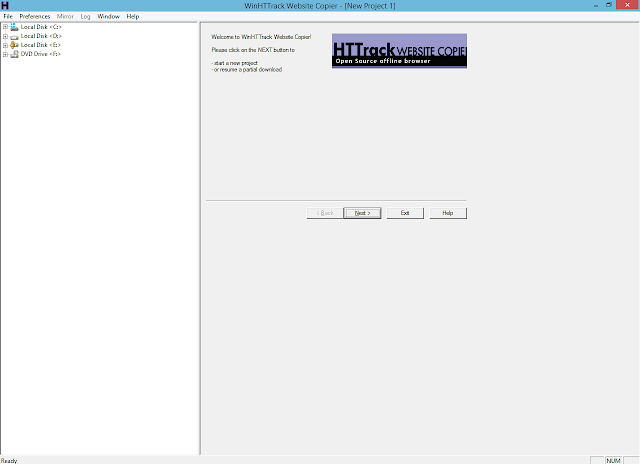
1.Once you launch the HTTrack software, you will see the interface like in below image you just click on next button and move on.


2.Now enter the name of you project, and select the category of which you want to extract the files, in my case I want to extract the html file of the website. Now click on next button.


3.You can see the Add URL button click on it to add your URL. 


4.After clicking on the Add URL button a popup window will appear on your screen, now only add the URL of the website, of which you want to get the source code and click OK.


5.After adding the URL click on the next button.


6.This page is not important just click on Finish and move on.

7.Your process has been started it will take few minutes, don't skip anything. It depends on  the files if you have the large file it will take more time to download and adjusting the source code.


8.When download complete you can see this type of window, do nothing and click on the Finish button.


FIND THE CODE

Go to your Local Disk C and search your folder. Once you find the folder, open it.

You can see the many files and folder, now i'm going to open the 2nd folder.

As you can see i have the all html css javascript files and also i have the all assets of the website now lets open one of this file in our code editor 

CHECK THE CODE

So friends finally, did you see that OMG what is this, we can see all the code of that website, now you can change the code or get the idea from this code or anything that you want you can do from it. 


So friends, stay tuned with my website for more informative and interesting material.


Saturday, 4 April 2020

404 custom page with animation

How to make animated 404 page:


                                       HTML CODE:

<html lang="en" >
<head>
  <meta charset="UTF-8">
  <title>Parallax Error 404 | Webdevtrick.com</title>
  <link rel="stylesheet" href="style.css">
 
</head>
<body>
 
    <section class="wrapper">
        <div class="container">
            <div id="PRllax" class="PRllax" data-hover-only="false">
 
                <div class="circle" data-depth="1.2"></div>
 
                <div class="one" data-depth="0.9">
                    <div class="content">
                        <span class="piece"></span>
                        <span class="piece"></span>
                        <span class="piece"></span>
                    </div>
                </div>
 
                <div class="two" data-depth="0.60">
                    <div class="content">
                        <span class="piece"></span>
                        <span class="piece"></span>
                        <span class="piece"></span>
                    </div>
                </div>
 
                <div class="three" data-depth="0.40">
                    <div class="content">
                        <span class="piece"></span>
                        <span class="piece"></span>
                        <span class="piece"></span>
                    </div>
                </div>
 
                <p class="p404" data-depth="0.50">404</p>
                <p class="p404" data-depth="0.10">404</p>
 
            </div>
 
            <div class="text">
                <article>
                    <p>This page has not been found. <br>You have lost!</p>
                    <button>go to home</button>
                </article>
            </div>
 
        </div>
    </section>
 
<script src='https://cdnjs.cloudflare.com/ajax/libs/parallax/3.1.0/parallax.min.js'></script>
<script src='https://cdnjs.cloudflare.com/ajax/libs/jquery/2.1.3/jquery.min.js'></script>
<script src="function.js">
    </script>
 
</body>
</html>

JAVASCRIPT CODE:
var PRllax = document.getElementById('PRllax');
 var parallax = new Parallax(PRllax);

CSS CODE:

@import url("https://fonts.googleapis.com/css?family=Josefin+Sans&display=swap");
 
h1,h2,h3,h4,h5,h6,p,ul,li,button,a,i,input,body {
  margin: 0;
  padding: 0;
  list-style: none;
  border: 0;
  -webkit-tap-highlight-color: transparent;
  text-decoration: none;
  color: inherit;
}
 
body {
  margin: 0;
  padding: 0;
  height: auto;
  font-family: 'Josefin Sans', sans-serif;
  background: #ff5757;
}
 
.wrapper {
  display: grid;
  grid-template-columns: 1fr;
  justify-content: center;
  align-items: center;
  height: 100vh;
  overflow-x: hidden;
}
.wrapper .container {
  margin: 0 auto;
  transition: all 0.4s ease;
  display: flex;
  justify-content: center;
  align-items: center;
  position: relative;
}
.wrapper .container .PRllax {
  position: absolute;
  width: 100vw;
  height: 100vh;
  vertical-align: middle;
}
.wrapper .container .one,
.wrapper .container .two,
.wrapper .container .three,
.wrapper .container .circle,
.wrapper .container .p404 {
  width: 60%;
  height: 60%;
  top: 20% !important;
  left: 20% !important;
  min-width: 400px;
  min-height: 400px;
}
.wrapper .container .one .content,
.wrapper .container .two .content,
.wrapper .container .three .content,
.wrapper .container .circle .content,
.wrapper .container .p404 .content {
  width: 600px;
  height: 600px;
  display: flex;
  justify-content: center;
  align-items: center;
  position: absolute;
  top: 50%;
  left: 50%;
  transform: translate(-50%, -50%);
  animation: content 0.8s cubic-bezier(1, 0.06, 0.25, 1) backwards;
}
@keyframes content {
  0% {
    width: 0;
  }
}
.wrapper .container .one .content .piece,
.wrapper .container .two .content .piece,
.wrapper .container .three .content .piece,
.wrapper .container .circle .content .piece,
.wrapper .container .p404 .content .piece {
  width: 200px;
  height: 80px;
  display: flex;
  position: absolute;
  border-radius: 80px;
  z-index: 1;
  animation: leftdir 8s cubic-bezier(1, 0.06, 0.25, 1) infinite both;
}
@keyframes leftdir {
  50% {
    left: 80%;
    width: 10%;
  }
}
@keyframes rightdir {
  50% {
    right: 80%;
    width: 10%;
  }
}
@media screen and (max-width: 799px) {
  .wrapper .container .one,
  .wrapper .container .two,
  .wrapper .container .three,
  .wrapper .container .circle,
  .wrapper .container .p404 {
    width: 90%;
    height: 90%;
    top: 5% !important;
    left: 5% !important;
    min-width: 280px;
    min-height: 280px;
  }
}
@media screen and (max-height: 660px) {
  .wrapper .container .one,
  .wrapper .container .two,
  .wrapper .container .three,
  .wrapper .container .circle,
  .wrapper .container .p404 {
    min-width: 280px;
    min-height: 280px;
    width: 60%;
    height: 60%;
    top: 20% !important;
    left: 20% !important;
  }
}
.wrapper .container .text {
  width: 60%;
  height: 40%;
  min-width: 400px;
  min-height: 500px;
  position: absolute;
  margin: 40px 0;
  animation: text 0.6s 1.8s ease backwards;
}
@keyframes text {
  0% {
    opacity: 0;
    transform: translateY(40px);
  }
}
@media screen and (max-width: 799px) {
  .wrapper .container .text {
    min-height: 400px;
    height: 80%;
  }
}
.wrapper .container .text article {
  width: 400px;
  position: absolute;
  bottom: 0;
  z-index: 4;
  display: flex;
  flex-direction: column;
  justify-content: center;
  align-items: center;
  text-align: center;
  bottom: 0;
  left: 50%;
  transform: translateX(-50%);
}
@media screen and (max-width: 799px) {
  .wrapper .container .text article {
    width: 100%;
  }
}
.wrapper .container .text article p {
  color: white;
  font-size: 18px;
  letter-spacing: 0.6px;
  margin-bottom: 40px;
  text-shadow: 6px 6px 10px #32243E;
}
.wrapper .container .text article button {
  height: 40px;
  padding: 0 30px;
  border-radius: 50px;
  cursor: pointer;
  box-shadow: 0px 15px 20px rgba(54, 24, 79, 0.5);
  z-index: 3;
  color: #695681;
  background-color: white;
  text-transform: uppercase;
  font-weight: 600;
  font-size: 12px;
  transition: all 0.3s ease;
}
.wrapper .container .text article button:hover {
  box-shadow: 0px 10px 10px -10px rgba(54, 24, 79, 0.5);
  transform: translateY(5px);
  background: #212121;
  color: white;
}
.wrapper .container .p404 {
  font-size: 200px;
  font-weight: 700;
  letter-spacing: 4px;
  color: white;
  display: flex !important;
  justify-content: center;
  align-items: center;
  position: absolute;
  z-index: 2;
  animation: anime404 0.6s cubic-bezier(0.3, 0.8, 1, 1.05) both;
  animation-delay: 1.2s;
}
@media screen and (max-width: 799px) {
  .wrapper .container .p404 {
    font-size: 100px;
  }
}
@keyframes anime404 {
  0% {
    opacity: 0;
    transform: scale(10) skew(20deg, 20deg);
  }
}
.wrapper .container .p404:nth-of-type(2) {
  color: #36184F;
  z-index: 1;
  animation-delay: 1s;
  filter: blur(10px);
  opacity: 0.8;
}
.wrapper .container .circle {
  position: absolute;
}
.wrapper .container .circle:before {
  content: '';
  position: absolute;
  width: 800px;
  height: 800px;
  background-color: rgba(54, 24, 79, 0.2);
  border-radius: 100%;
  top: 50%;
  left: 50%;
  transform: translate(-50%, -50%);
  box-shadow: inset 5px 20px 40px rgba(54, 24, 79, 0.25), inset 5px 0px 5px rgba(50, 36, 62, 0.3), inset 5px 5px 20px rgba(50, 36, 62, 0.25), 2px 2px 5px rgba(255, 255, 255, 0.2);
  animation: circle 0.8s cubic-bezier(1, 0.06, 0.25, 1) backwards;
}
@keyframes circle {
  0% {
    width: 0;
    height: 0;
  }
}
@media screen and (max-width: 799px) {
  .wrapper .container .circle:before {
    width: 400px;
    height: 400px;
  }
}
.wrapper .container .one .content:before {
  content: '';
  position: absolute;
  width: 600px;
  height: 600px;
  background-color: rgba(54, 24, 79, 0.3);
  border-radius: 100%;
  box-shadow: inset 5px 20px 40px rgba(54, 24, 79, 0.25), inset 5px 0px 5px rgba(50, 36, 62, 0.3), inset 5px 5px 20px rgba(50, 36, 62, 0.25), 2px 2px 5px rgba(255, 255, 255, 0.2);
  animation: circle 0.8s 0.4s cubic-bezier(1, 0.06, 0.25, 1) backwards;
}
@media screen and (max-width: 799px) {
  .wrapper .container .one .content:before {
    width: 300px;
    height: 300px;
  }
}
.wrapper .container .one .content .piece {
  background: linear-gradient(90deg, #8077EA 13.7%, #EB73FF 94.65%);
}
.wrapper .container .one .content .piece:nth-child(1) {
  right: 15%;
  top: 18%;
  height: 30px;
  width: 120px;
  animation-delay: 0.5s;
  animation-name: rightdir;
}
.wrapper .container .one .content .piece:nth-child(2) {
  left: 15%;
  top: 45%;
  width: 150px;
  height: 50px;
  animation-delay: 1s;
  animation-name: leftdir;
}
.wrapper .container .one .content .piece:nth-child(3) {
  left: 10%;
  top: 75%;
  height: 20px;
  width: 70px;
  animation-delay: 1.5s;
  animation-name: leftdir;
}
.wrapper .container .two .content .piece {
  background: linear-gradient(90deg, #f79d00 0%, #64f38c 100%);
}
.wrapper .container .two .content .piece:nth-child(1) {
  left: 0%;
  top: 25%;
  height: 40px;
  width: 120px;
  animation-delay: 2s;
  animation-name: leftdir;
}
.wrapper .container .two .content .piece:nth-child(2) {
  right: 15%;
  top: 35%;
  width: 180px;
  height: 50px;
  animation-delay: 2.5s;
  animation-name: rightdir;
}
.wrapper .container .two .content .piece:nth-child(3) {
  right: 10%;
  top: 80%;
  height: 20px;
  width: 160px;
  animation-delay: 3s;
  animation-name: rightdir;
}
.wrapper .container .three .content .piece {
  background: linear-gradient(90deg, #3498db 0%, #2c3e50 100%);
}
.wrapper .container .three .content .piece:nth-child(1) {
  left: 25%;
  top: 35%;
  height: 20px;
  width: 80px;
  animation-name: leftdir;
  animation-delay: 3.5s;
}
.wrapper .container .three .content .piece:nth-child(2) {
  right: 10%;
  top: 55%;
  width: 140px;
  height: 40px;
  animation-name: rightdir;
  animation-delay: 4s;
}
.wrapper .container .three .content .piece:nth-child(3) {
  left: 40%;
  top: 68%;
  height: 20px;
  width: 80px;
  animation-name: leftdir;
  animation-delay: 4.5s;
}

Saturday, 28 March 2020

How to tell Google your new website exists/Sitemap

CREATE A SITEMAP:

A sitemap (XML file) tells Google and other search engines what pages, posts and other content you have on your website. It helps them find all your content and index it faster.

SUBMIT YOUR WEBSITE:

Keep Gogle in the know when pages are being updated. It is an automatic notification for google when you submit sitemap. It make sure that Google doesn't leave any page unchecked. Give you control on which pages are prioritized. Those pages will be crawled and indexed faster.

Submit your website to Google search console formerly webmaster tools, via the 'add property' button to let them know it exists. Extra points for adding it to Bing webmaster tools.

SUBMIT THE SITEMAP:

The sitemap you created in step 1 should now be submitted to search engines so they know what pages and posts are on your website now and in the future.

BONUS POINTS:

There are a couple of other things you could do to improve your website. Make sure you have analytics (probably Google) and submit both versions of you site to webmaster tools (www and non_ www). Set the preferred version afterwards.

MY SITEMAP:


Overall it helps you rank on google faster.

Friday, 27 March 2020

Responsive css3 html5 and bootstrap4 with SEO website

Creating a responsive css 3 html 5 and bootstrap 4 website:


If you build it

The columns will automatically stack on top of eachother when the screen is less than 576px wide.
Resize the browser window to see the effect. Responsive web design has become more important as the amount of mobile traffic now accounts for more than half of total internet traffic.
It can also dispaly the web page differently depending on the screen size or viewing device.

Our Philosophy

We know that greatness in a disrupitive era requries bold ambition, curious talent and culture that believes we're smarter together.
We apporach every challenge holistically, with best in-class expertise in data, creativity, media, technology, search, social and more. We call this Alchemy. It has the power to build our clients brands and transform their bussiness. And while it may seem like magic, we're got it down to a science.

SEOs:

Among the many components to SEO, technical SEO is the foundation upon which all other tactics are built. In the SEO - Technical Audit course, I'll guide students through the nuts and bolts of technical SEO, from its purpose and value to its execution. The focus will be on technical SEO tools and how to use them, approaching a client, and performing an audit. This course is intended for all levels, from beginners to seasoned SEO pros who might need a technical refresher.
I will walk you through every step of landing page design with real-life case studies, actual experiments and tons of examples from around the web. This course will teach you the fundamental psychological principles of good landing page design, and it will help you understand the buyer's journey so you can design landing pages that convert better. I will also be teaching you how to test your designs so you can design final landing pages that will convert 20-30% more than your current website and landing pages. By the end of this course, you'll be able to design landing pages that convert 2X - 5X more than your current landing pages.   

Sunday, 15 March 2020

Lines of code

DO YOU KNOW ?

Every website or application is made up of lines of code, but here i bring the amazing and unexpecting fact that i will share with you all.

Do you know how many lines of code are required for GOOGLE?


GOOGLE is made up of 2 billions  of lines of code. An ordinary programmer can not imagine this but this is the fact and you should believe on this.Google covers trillions of data in it due to this strong and static coding.


Do you know how many lines of code are required for FACEBOOK?


FACEBOOK  is made up of 62 millions of lines of code and this lines are only for front end coding if we also include the backend coding then its lines of code are upto 1 billion.


Do you know how many lines of code are required for WINDOW?


WINDOW is made up of 50 millions of lines of code. Window bring updates so its lines are going up and down.


Do you know how many lines of code are required for LINUX?


LINUX  is made up of 12 millions of lines and this is also change day by day 


So friends today i told you that things which you should know these are the biggest invention of the web development.Hope you like it stay tuned keep watching and Thank You!